Introduction
When a task management platform is compromised, attackers may not be most interested in users' to-do lists, but rather in the wallet mnemonic phrases, private keys, and API keys hidden within them.
Todoist, a globally renowned task management platform with over 50 million users, recently disclosed a cybersecurity incident. Attackers used stolen developer credentials to tamper with automated workflows in three code repositories, gradually gaining internal access and entering the cloud production environment. Ultimately, they downloaded the email addresses, account creation dates, and old salted SHA-1 password hashes of approximately 6% of the users.
Even more alarming is that the attackers also conducted targeted searches on a small number of users' tasks, comments, attachments, and associated Outlook email addresses, focusing on finding cryptocurrency wallet mnemonic phrases, private keys, and sensitive credentials for services such as GitHub, AWS, Google, OpenAI, and Anthropic.
Through this incident analysis, GCSA has identified the risks of permission transfer behind the development automation workflow failure, the exposure scope of different types of user data, and the security measures that relevant users and enterprises should take.
Original Analysis Report
Todoist was compromised: stolen developer credentials were used to rewrite automated workflows, old password hashes for approximately 6% of users were downloaded, and attackers also searched for mnemonic phrases within tasks.
Daily Security Insights (Event Analysis) | November 27, 2026 | All times in this article are Tokyo time (UTC+9)
Task management application Todoist released an incident statement in the early morning of November 25th (Tokyo time), and added details on November 26th: From November 22nd to 23rd, an attacker used a stolen version control system credential to rewrite automated workflows in three code repositories, obtaining more credentials and ultimately gaining access to the cloud production environment as an employee. The attacker exported the email addresses and old password hashes (salted SHA1) of approximately 6% of users from the production database, and also queried API tokens and Slack integration tokens for a very small number of accounts. The attacker searched for credentials in users' tasks and comments using keywords such as "seed phrase," "mnemonic," and "private key," and read the beginnings of emails connected through Todoist for Outlook.
The most noteworthy aspect of this incident is the method the attackers used to extract data after gaining production access: instead of dragging the entire database, they selectively searched for mnemonic phrases, private keys, cloud service keys, and exchange-related emails. Even if you only wrote down an API key or wallet recovery phrase in a task and then deleted it afterward, as long as it was still there on November 23, it should be treated as a leak.
I. Event Timeline
Table 1: Todoist Intrusion and Handling Timeline (Official UTC time converted to Tokyo time)
| Time (Tokyo time UTC+9) | event | Source/Evidence |
|---|---|---|
| 11-22 23:04 | The earliest date of use of the stolen development credentials identified; attackers begin rewriting automated workflows to obtain more credentials. | Todoist Event Description & Timeline |
| 11-23 15:06 | By automating an infrastructure workflow, administrator credentials for employee login to the system can be obtained. | Same as above |
| 11-23 15:33–15:54 | Modify an employee's authentication settings and log in to the cloud infrastructure as that employee. | Same as above |
| 11-23 17:20–17:22 | Create additional accounts to maintain access to the infrastructure. | Same as above |
| From 18:08 on November 23 | Access the production database and execute commands within the production infrastructure. | Same as above |
| 11-23 21:45–21:51 | Export and download account records containing email addresses and old password hashes. | Same as above |
| 11-23 22:05–11-24 02:12 | Targeted query for account tokens, access to connected Outlook email accounts, and search for credentials within selected Todoist content. | Same as above |
| 11-24 02:01 | Todoist discovered an unusual administrator account through security monitoring and began an investigation. | Same as above |
| 11-24 02:10–02:42 | Disable the access key created by the attacker in the main production account, delete the attacker account, and restrict remote command execution. | Same as above |
| 11-24 14:06 | Disable Todoist for Outlook email plugin | Same as above |
| 11-25 01:11 | Official statement on the incident released for the first time (16:11 UTC) | Description page revision history |
| 11-25 02:52–18:39 | Send notification emails to affected users | Todoist Event Description & Timeline |
| 11-26 02:23 | Complete the revocation of affected Slack integration tokens | Same as above |
| 11-26 02:51 | Additional information on the documentation page: What data was read using the exposed API token, the complete search terms, and the truncation length. | Description page revision history |
| 11-27 03:02 | Send emails to users whose passwords were reset as a precaution, explaining that their accounts have not been compromised. | Todoist Event Description & Timeline |
II. How attackers gradually infiltrated the production environment.
The first step was to "extract" credentials from the automated workflows of the code repository.Todoist states that the attacker possessed a credential associated with the version control system. Instead of using this credential to modify the application code (the official investigation found no changes), the attacker modified the automated workflows of three repositories. This step succeeded because the workflows use secrets configured within the repository or organization: whoever can modify the workflow definition can make the workflow relinquish these secrets during execution. The credential itself only "allows modification of the repository," but after passing through the workflow, it becomes "allows access to all credentials that the workflow can access." At this stage, the attacker could also read the source code.
The second step involved obtaining the administrator credentials for the employee login system.At 15:06 on November 23, the attacker obtained the administrator credentials for the employee login system through an infrastructure automation workflow. These credentials control "how employees log into the internal system," so their danger lies not in directly reading data, but in the ability to modify other people's login methods.
The third step involved modifying authentication settings and impersonating an employee.Between 15:33 and 15:54, the attacker modified an employee's authentication settings and logged into the cloud infrastructure as that employee. Then, around 17:20, the attacker created an additional account to ensure that even if the employee's account was compromised, they could still remain logged in.
The fourth step involved data extraction from the production environment.Starting at 18:08, the attackers accessed the production database and executed commands within the production infrastructure; from 21:45 to 21:51, they exported and downloaded early user account records; and from 22:05, they conducted targeted searches of tokens, email addresses, and user content. It wasn't until 02:01 on November 24th that Todoist's security monitoring discovered an unexpected administrator account, allowing the response team to remove the attackers' access within 40 minutes.
As for how the first credential was stolen, Todoist says it is still under investigation. The main speculation is that an employee's device was compromised, and the company has rebuilt the employee's work environment and reinforced the relevant accounts.
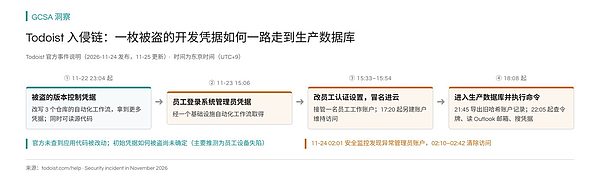 Figure 1: Attack Chain: Stolen version control credentials are used in an automated workflow to obtain more credentials, which are then used to modify employee authentication settings and enter the production environment (Todoist official explanation).
III. Which data was taken?
The authorities divided the affected accounts into four groups with approximate proportions and little overlap between the groups.
Approximately 6% of users had their email address, old password hash, and account creation date flagged.This group consisted of early registrants who hadn't changed their passwords in over a decade. Todoist no longer uses salted SHA1 hashes for passwords, but only switches to the new algorithm when users change their passwords, thus these accounts retained the old hashes. While salting prevents a batch cracking of all passwords at once, it doesn't stop guessing individual hashes: SHA1 is extremely fast, and weak passwords or passwords leaked elsewhere can be easily guessed. The official team has completely stopped supporting SHA1, reset the Todoist passwords of these users, and logged them out; a review of new sessions created for these accounts revealed no attackers using them to log in.
Approximately 0.003% of users: Todoist API tokens and Slack integration tokens.A small fraction of these accounts' API tokens were actually used by attackers to read project, task, and comment data via Todoist's/syncinterface.
Approximately 0.001% of users: Content was retrieved using credentials.The attackers first conducted manual searches, and then ran an automated scanner. The manual search keywords includedseed,"seed phrase,"mnemonic," "privateprivate key," "chave privada," "xprv," "metamask,"recovery phrase," andfrase de recuperação." They also searched forseed,"wallet,"mnemonic," andpassin attachment filenames, and matched formats such as API tokens, private keys, service account credentials, Slack webhooks, and URLs with usernames and passwords. The automated scanner had a broader scope, covering credential formats from services such as GitHub, GitLab, AWS, Google, Azure, Cloudflare, Okta, OpenAI, Anthropic, OpenRouter, Stripe, Shopify, and Slack, Discord, and Telegram. The length of the returned text was also recorded: the manual keyword search retrieved the first 300 or 320 characters of the matched content, while the automated scanner retrieved a maximum of 700 characters. These excerpts are taken from the beginning of the text, and short entries are taken in their entirety.
Approximately 0.001% of users had email accounts connected to Todoist for Outlook.Attackers used credentials obtained from this plugin to send requests to email accounts with read access: to read the first 255 characters of each of the 10 most recent emails, along with attachment names, types, sizes, and links; and to retrieve 25 or 50 results for each email account based on keywords. The keywords were categorized as follows: credentials such aspassword,api key,token, andVPN; development and cloud services such asgithub,npm,docker, andkubernetes; cryptocurrency services and wallets such asbinance,coinbase,okx,metamask,ledger,trezor, andairdrop; and file sharing services such asdropbox,onedrive, andmega.nzThe official documentation states that these requests did not require the return of the complete email body.
The official documentation also specifically notes that the recorded commands only indicate what the attacker requested. Some commands timed out, and some were interrupted by Todoist, so it is impossible to determine how much the attacker ultimately saw. Therefore, all requests were reported according to their scope.
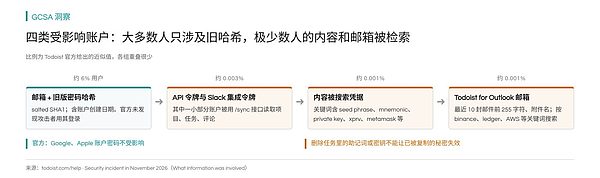
Figure 2: Four types of affected accounts and corresponding data; searches for content and emails clearly target mnemonic phrases, private keys, and cloud and exchange credentials (Todoist official statement).
IV. What has Todoist already done?
After clearing attacker access, Todoist deleted all cloud accounts created by the attacker, revoked the credentials used for intrusion, stopped the attacker's running tasks, reviewed the modified authentication settings, and restricted remote command execution in the cloud environment. For users, the official team disconnected the relevant OAuth applications, disabled the Outlook plugin, set shorter expiration times for relevant access tokens, and revoked the Slack integration token.
To prevent similar intrusions, Todoist rotated exposed internal credentials, tightened permissions granted for development automation, further restricted which changes could trigger sensitive infrastructure workflows, and blocked paths used by attackers to move between systems. The official team also added an automated code review to flag changes that might leak credentials or privacy data through development workflows.
V. What should you do now?
1. Please refer to the notification emails.Each notification is tailored to your individual situation, specifying the data you are affected by and the necessary actions. Users who do not receive a notification are advised that no action is required. Notifications will only come from[email protected]. Todoist will not ask you to send your password or install any software.
2. Reset your password and check if it's being reused elsewhere.Users whose passwords have been deactivated need to reset them. Do not use your old Todoist password or passwords used on other websites. If your old password has been used on other services, change it on those services as well. Users logged in with Google or Apple accounts who receive hash-related notifications are referring to a separate Todoist password set for their account; Google and Apple passwords are not affected.
3. Update tokens and integrations.For scripts or services that use the Todoist API token, go to "Settings → Integrations → Developer" in the web version to get the new token and replace it; Slack integrations that have been disconnected need to be reconnected; Todoist for Outlook needs to be reauthorized (new applications may appear unverified before completing Microsoft verification, and enterprise or school accounts may be temporarily blocked by the administrator).
4. Treat secrets stored in Todoist as if they have been leaked.If you have ever stored API keys, access tokens, mnemonic phrases, or other credentials in projects, tasks, or comments, you must have them revoked and replaced by the corresponding service. If your wallet recovery phrase may have been leaked, you should transfer your assets to a wallet with a newly generated mnemonic phrase. The official documentation explicitly states that deleting content does not invalidate secrets that have already been copied. For tasks that share document links that are "accessible to anyone who gets the link," tighten access restrictions or replace them with new links.
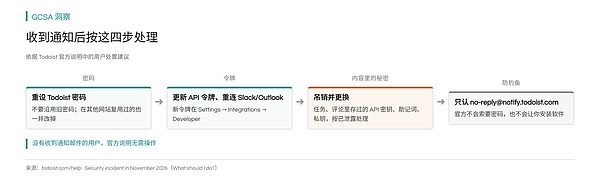
Figure 3: User-side handling: resetting passwords, updating tokens and integrations, revoking secrets within content, and only recognizing official notification addresses (Todoist official instructions).
VI. Main Sources
- Todoist: Security incident in November 2026 (Official incident statement, including timeline and revision history):
https://www.todoist.com/help/todoist/get-started/security-incident-in-november-2026-cG0EIACNU - TechCrunch: Todoist confirms 6% of customers' details were stolen in data breach (2026-11-25):
https://techcrunch.com/2026/11/25/todoist-confirms-6-of-customers-details-were-stolen-in-data-breach/ - TechRadar's coverage of the same official statement:
https://www.techradar.com/pro/security/todoist-confirms-data-breach-says-6-percent-of-customers-details-were-stolen-including-email-ids-and-account-info
Conclusion
The Todoist incident revealed two types of easily underestimated security risks: permission transfer in development automation, and the accumulation of sensitive credentials in everyday office tools.
Developing implicit trust chains in automation
There are complex trust relationships between code repositories, CI/CD workflows, employee identity systems, and cloud production environments. Attackers may not need to directly compromise the core application; they only need to breach one vulnerable point to gradually expand their access privileges.
Automation improves development efficiency, but it can also amplify the harm of a single credential breach. Enterprises not only need to protect their production environment, but also need to scrutinize every automation path that leads to it.
"Shadow credential repository" in everyday office tools
API keys in task lists, wallet mnemonic phrases in online documentation, and access tokens in emails may all exist outside the formal credential management system, forming implicit "shadow credential repositories".
The targeted searches in this attack demonstrate that attackers are not only interested in the platform's own data, but also in other digital assets and services that this data can unlock. The potential value of a single ordinary to-do item may far exceed that of a large amount of regular user data.
Re-examining the security boundaries of the digital ecosystem
In today's world, where digital assets, AI services, and cloud infrastructure are highly interconnected, the number of users and the scale of leaked data alone are no longer sufficient to fully assess the potential harm of a security incident.
Enterprises need to strengthen cross-platform identity, permission, and credential management; individual users should not use ordinary office tools as storage space for sensitive credentials.
What truly determines the boundaries of harm from a data breach is not just how much data was leaked, but also how many doors that data can open.
Copyright and Disclaimer
This article was published by the GCSA Global Cybersecurity Alliance. Copyright of original content belongs to GCSA; copyright of third-party content cited or reproduced belongs to the original rights holder. Please indicate the source and retain the original link when reprinting.
This article is for cybersecurity research and informational purposes only and does not constitute investment, legal, or financial advice. The related technical analysis, risk assessments, and attack attributions are based on existing evidence. The scope of GCSA's independent verification is as disclosed in this article, and the conclusions may be updated as new evidence emerges.
Follow GCSA on social media for the latest updates.
GCSA X (Twitter):
GCSA Telegram:
GCSA WeChat Official Account:
https://mp.weixin.qq.com/s/ouyL9NwrDDjhMumvehdOmw
Source:Global Cybersecurity Alliance (GCSA)
Website:www.gcsa.org
Get updates in your inbox
We respect your privacy. See our Privacy Policy