Introduction
Why would a company that safeguards people's personal passwords allow malicious code to infiltrate its backend simply because an employee's GitHub account was compromised?
In a notification released on November 25, 1Password disclosed that attackers used an employee's corporate GitHub account to access internal code, push malicious code to the backend service, and download some customer account information, including names, login emails, and tokens from certain invitation, activation, and account recovery emails. The attackers also copied the private repository source code and gained access to the Continuous Integration and Delivery (CI/CD) system. The total number of affected customers has not yet been disclosed.1password.com
According to 1Password's investigation, customer password vaults, their entries, and the keys protecting them were unaffected. This conclusion is significant. For users, a "account recovery notification" addressed precisely by their name and sent to their logged-in email address is far more convincing than a phishing email flooding their inbox. After the public disclosure, even the imposter's opening line has readily available material: "You may have been affected by a recent security incident."1password.com
This incident raises questions about a trust chain that is rarely seen by users. Who can modify the code? Who can deploy the code? And how much customer data can the deployed code access? 1Password has already disclosed the consequences of the intrusion. However, the deployment steps involved, from the loss of employee accounts to the malicious code running on the backend, remain a gap in the public report.
1Password backend compromised: Employee GitHub accounts used to deploy malicious code, some customer account data downloaded.
Daily Security Insights (Event Analysis) | November 26, 2026 | All times in this article are Tokyo time (UTC+9)
Password, a password management service, announced on November 25th that it began investigating an intrusion into its backend systems on November 19th. The attacker first gained access to an employee's corporate GitHub account, using it to access internal code repositories and push malicious code to the backend service. This code then downloaded some customer account records. The stolen content included customers' names and email addresses used to log in to 1Password, as well as account identifiers, creation and last login times, and tokens from certain invitation, activation, and account recovery emails. The password vault, its entries, and the keys protecting the password vault were not accessed. 1Password does not store account passwords or secret keys.
The official assessment is that the application and services are functioning normally, and users do not need to change any settings in their 1Password account. What needs more attention now are invitations or account recovery notifications impersonating 1Password.
I. Event Timeline
Table 1: Public Timeline of 1Password Backend Intrusion
| Time (UTC+9) | event | source |
|---|---|---|
| 2026-11-19 | 1Password begins investigation: Indications suggest attackers gained access to an employee's corporate GitHub account. | 1Password Official Instructions |
| During the investigation | The attackers accessed the source code, pushed malicious code to the backend service, and downloaded some customer account records; they also copied the private repository source code and gained access to the CI/CD system. | 1Password Official Instructions |
| During the disposal process | Disable stolen GitHub accounts, revoke stolen tokens, remove attacker-created access codes, and rotate potentially exposed internal credentials; extend invitation and recovery CAPTCHAs from 6 digits to 10 alphanumeric characters. | 1Password Official Instructions |
| 2026-11-25 | 1Password issued an official statement saying that it has restored a clean version of the affected service and has engaged an independent security firm to review containment and remediation efforts. | 1Password Official Instructions |
II. How attacks penetrate the backend
The entire chain started with the company's GitHub account, not the 1Password client. After gaining access to this account, the attackers were able to read the internal source code and push malicious code to the backend service to run. The official documentation states that this code was used to download the client's account management data. Simultaneously, the attackers also copied the source code from the private repository and gained access to the company's CI/CD environment.
The official statement categorizes the source code and CI/CD separately: the source code is not customer data and does not contain user keys; the CI/CD, however, contains secrets related to the infrastructure required for the product to operate. 1Password has begun rotating all potentially exposed credentials and stated that this incident has not affected the availability of 1Password's services or the security of its products.
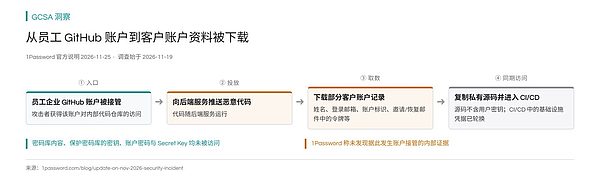 Figure 1: Attack Path: The company's GitHub account was used to deliver malicious code to the backend and then download some customer account records (1Password official explanation).
III. What was taken away?
The official scope refers to account records for "a subset of users," not all customers. These records include: name and email address; account and user identifier, as well as account creation and most recent login times; public keys (officially stated to be public and have no impact on user security); Secure Remote Password Protocol (SRP) parameters (officially stated to be unusable for account access); tokens from certain invitation, activation, and account recovery emails; and other non-secret metadata related to the internal architecture, such as version and file digital identifiers.
The official documentation provides more details about the email tokens. A token is included in emails sent to customers when sending activation invitations (for SCIM Bridge or managed activation) or accepting account recovery requests. In this incident, the number of users in this state is small, and they have already received individual notifications. To complete the invitation or recovery process, this token must be used in conjunction with SSO login or a verification code sent to the user's registered email address; the token alone is insufficient to access the account. To reduce the possibility of the verification code being guessed, the official documentation has extended the verification code from 6 digits to 10 alphanumeric characters.
The same statement also lists the untouched parts: the password vault and its entries; the keys protecting the password vault; account passwords and secret keys (1Password doesn't store these two items anyway); account recovery keys; and 1Password applications and browser extensions. The official statement also states that internal evidence has been verified and no evidence has been found that anyone used the exposed activation token to take over accounts.
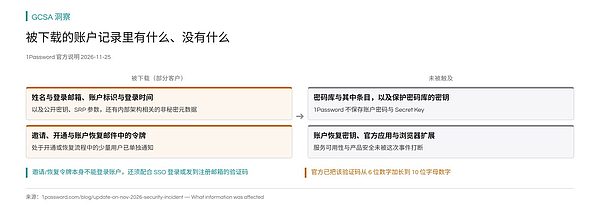
Figure 2: Comparison of downloaded account records with untouched password databases and keys (1Password official explanation)
IV. What has the government done? What should you do now?
At the time of the public statement, 1Password had already disabled the stolen GitHub account, revoked the stolen token, and removed attacker-created access; rotated or revoked potentially exposed internal credentials; lengthened the CAPTCHAs in invitation and recovery emails; tightened internal GitHub, CI/CD, and endpoint controls and increased detection for this type of attack; and brought in an independent cybersecurity company to review containment and remediation measures.
For ordinary users, the official actions taken are very focused:
1. No changes are needed to your 1Password account settings.The official documentation clearly states, "You do not need to update anything in your 1Password account," and the app and services are functioning normally.
2. Treat invitations and recovery requests that are not proactively initiated as phishing.Once your name, email address, and email token are obtained, the most direct consequence is impersonating 1Password to send emails, text messages, or make phone calls. Only log in through the official app or at the website address you manually entered; the Secret Key is only needed for the first login on a new device or with a new browser.
3. Remember, 1Password will never ask you for your account password or Secret Key.Giving your keys to any unsolicited "customer service," "recovery," or "security notification" is fraudulent. If you notice anything unusual, report it to 1Password at [email protected].
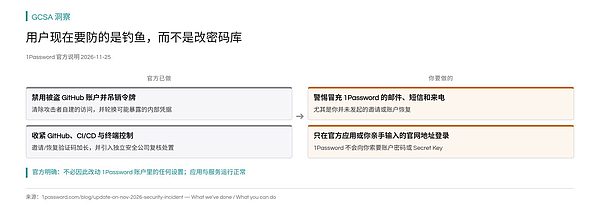
Figure 3: Official containment measures completed, and phishing paths users need to be wary of (1Password official explanation)
V. Main Sources
- 1Password: Update on a security incident involving 1Password's backend systems (2026-11-25):
https://1password.com/blog/update-on-nov-2026-security-incident - BleepingComputer's coverage of the same official statement:
https://www.bleepingcomputer.com/news/security/1password-customer-data-stolen-after-employee-github-account-breach/ - TechCrunch's report on the same official statement:
https://techcrunch.com/2026/11/25/1password-said-hackers-broke-into-its-internal-systems-but-customer-passwords-are-safe/
Conclusion
For users, the most direct action is to regain control over the verification process. 1Password states that there is no need to change account settings for this incident. If you receive an unexpected account notification, simply open the official app to verify. Only enter your account password and Secret Key in the official app you open yourself or on the official website you manually access by entering the address. 1password.com
For security vendors, an intrusion is also a practical test of their security architecture. If the client's password vault and keys remain untouched, this boundary has withstood the test. The fact that some account data was downloaded indicates that identity information also deserves rigorous scrutiny. The true strength of a security architecture is revealed after someone has already breached it. At that point, how much can the system still protect for its users? This is the question a post-incident analysis should answer.
Copyright and Disclaimer
This article was published by the GCSA Global Cyber Security Alliance. Copyright of original content belongs to GCSA; copyright of third-party content cited or reproduced belongs to the original rights holder. Please indicate the source and retain the original link when reprinting.
This article is for cybersecurity research and informational purposes only and does not constitute investment, legal, or financial advice. The related technical analysis, risk assessments, and attack attributions are based on existing evidence. The scope of GCSA's independent verification is as disclosed in this article, and the conclusions may be updated as new evidence emerges.
Follow GCSA on social media for the latest updates.
GCSA X (Twitter):
https://x.com/gcsa_com
GCSA Telegram:
https://t.me/GCSAofficial
GCSA WeChat Official Account:
https://mp.weixin.qq.com/s/ouyL9NwrDDjhMumvehdOmw
Source:Global Cybersecurity Alliance (GCSA)
Website:www.gcsa.org
Get updates in your inbox
We respect your privacy. See our Privacy Policy