Foreword
From exchange brand phishing and malware deployments to AI tool supply chain risks and million-dollar smart contract vulnerabilities, a series of security incidents and risk clues have surfaced recently. Attackers may not only exploit code flaws to transfer assets, but also hide threats within user-trusted operational processes by forging official identities or controlling software dependencies.
The Global Cybersecurity Alliance (GCSA) investigated security incidents and potential risks involving the KuCoin, Bitkub, and Avalanche ecosystems through threat intelligence agent monitoring, independent technical forensics, and on-chain transaction tracing, resulting in three independent technical analysis reports.
During its email security investigation of KuCoin, GCSA discovered that attackers impersonated [email protected], using a fake security center to trick users into downloading a suspected remote control program. The investigation also found a missing DMARC configuration issue on the ku.com domain. Following notification from GCSA, the KuCoin security team confirmed the issue and reported that it has been rectified, with a DMARC isolation policy now in place.
During its investigation of Bitkub AI tools, GCSA discovered that the MCP toolkit, previously referenced in its official documentation, had its npm package name re-registered by a third-party account after the original version was removed from the platform. This lack of a fixed installation version, coupled with the potential for API keys to be stored in plaintext, exposes users to potential software poisoning and credential leakage risks. No evidence of actual key theft has yet been found.
During its investigation of the Avalanche ecosystem, GCSA, through on-chain tracing and contract decompilation, reconstructed how the TranchePool vault was exploited due to a flaw in its cross-day settlement logic. The attacker used flash loans and duplicate withdrawals to complete two transactions within approximately 202 seconds, transferring out approximately 1,013,400 USDC. This incident stemmed from a smart contract vulnerability within the ecosystem, and was not an attack on the Avalanche underlying network.
The three investigations cover identity fraud, software supply chain risks, and smart contract vulnerabilities, involving different attack mechanisms and levels of evidence. They include identified phishing attacks, risks yet to be proven to be exploited, and contract vulnerabilities that have already caused financial losses.
These findings indicate that digital asset security risks exist not only in the underlying protocols, but also hidden in official emails, reliance on AI tools, and contract business logic.
In accordance with the principle of responsible disclosure, GCSA has notified relevant platforms of security clues and provided technical analysis reports through official channels. As of press time, KuCoin has responded with its verification results and confirmed the completion of relevant email security configuration rectification; Bitkub has not yet responded.
GCSA is now releasing three independent technical investigation reports, retaining the original analysis and key evidence, for industry verification and reference. The research conclusions will be continuously updated based on new evidence and feedback from relevant parties.
[Part 1] Analysis of the Phishing Attack in KuCoin's Official Email Address
Recently, our threat intelligence agent detected phishing email attacks targeting KuCoin users, and some clients also reported receiving such emails to GCSA. Interestingly, the emails displayed the sender address as [email protected], using the official ku.com domain, and the sender name displayed in the inbox was KU Security Center. The email claimed that the user's account had experienced anomalies and urged the user to follow the instructions in the email. A sender address with an official domain made these requests appear to be a security notification from the exchange. We compared the sender information in the inbox with the original email text and found that the displayed official identity and the actual delivery source were inconsistent. The investigation therefore focused on email authentication: the attackers used their own mail delivery facilities but placed the official address where the user saw it. We then examined the authentication records left by the mail receiving system to verify the relationship between the authenticated domain and this official identity.
1. ku.com sending address spoofing
We checked the original email, SPF
Both DKIM (email signature authentication) and the sender signature verification (DKIM) showed as successful. However, the authentication result corresponds to ku-security.com, while the sender field (From) shows [email protected]. Looking at the delivery information, the bounce address is [email protected], and the delivery host is mail.ku-security.com. SPF checks use the domain name in the bounce address; an attacker could authorize their own server to send emails, thus passing this check. DKIM also uses the attacker's own signature domain, including the official address in the From field. The recipient verifies this signature using the public key published by the phishing domain. An attacker controlling the delivery server can fill in the From field themselves; forging this field doesn't require prior login access to the official email address.
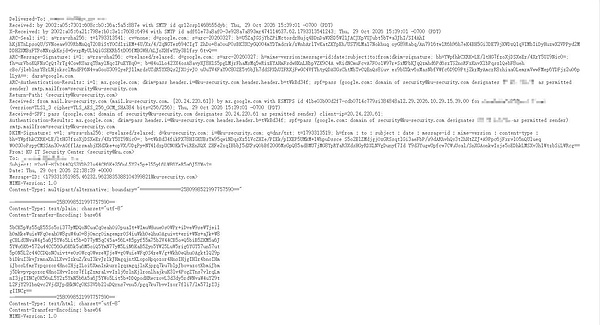 Figure 1. Original email text. The From address is written as [email protected], but it was actually delivered by ku-security.com.
2. DMARC configuration is missing on ku.com.
On October 29, 2026, ku.com had no DMARC record. DMARC checks domains that have passed SPF or DKIM certification against the domains shown in the From field. An email only passes DMARC if at least one certification passes and the domains are aligned. In this case, both delivery and signature used a phishing domain, but the From field used the official domain. Without this record, the recipient cannot find the official domain's quarantine or rejection requirements for emails with alignment failures. ku.com's SPF ends with ~all, marking unauthorized sources as soft failures. However, when this email underwent SPF checking, the authorization record of the phishing domain was used; this rule for the official domain was not used to verify its delivery. Tightening this SPF rule will not automatically add a domain alignment check for the From field. kucoin.com's DMARC policy at the same time was quarantine, which applies to its own sending domain and does not automatically override another independently registered domain.
3. Analysis of counterfeit security centers and remote control samples
The email subject was "[KuCoin] Please check your fund security immediately," and the body button read "Go to the Security Center immediately." The Gmail sender was [email protected], and the domain was ku-security.com. The body of the email instructed users to immediately check recent logins, withdrawals, and security settings, listing account anomalies as an urgent matter. This phishing email also included anti-fraud warnings, claiming the exchange would not call or request verification codes, passwords, or Google CAPTCHAs. It instructed users to stop all transfers and verification code requests outside of the email and only contact customer service through the Security Center; it also instructed users not to continue any operations through other channels until confirmation was complete. The email was signed "System Email, Do Not Reply." The anti-fraud warning was used as a pretext to guide users to click the button: the email warns against external contact, yet presents the email's entry point as a way to check account information.
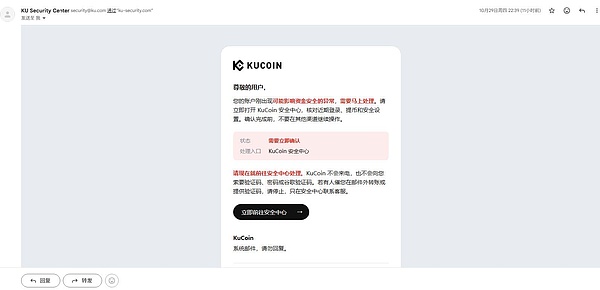 Figure 2 shows the phishing email received by the customer. The sender appears to be [email protected], and the email was delivered via ku-security.com.
In the screenshots provided by the customer, the next step has changed to selecting Windows or macOS. The email stated that login, withdrawal, and security settings needed to be verified, but upon reaching the fake KuCoin security center, the user was asked to select their computer system first. The page explained this action as "completing confirmation in the corresponding environment" and urged the user to continue with "Please complete the selection now." The screenshot shows the system selection entry, without listing the login records or withdrawal information to be verified. To continue with the so-called confirmation, the recipient must first accept the requirement to obtain a file from the page. The anti-fraud tone of the email has also been carried over to the webpage, with the bottom continuing to remind users to stop transferring funds or providing verification codes outside the page, requiring them to complete the process within the current page. The exchange logo and customer support text remain on the page, but the user's required action has changed from viewing their account to selecting a file to download.
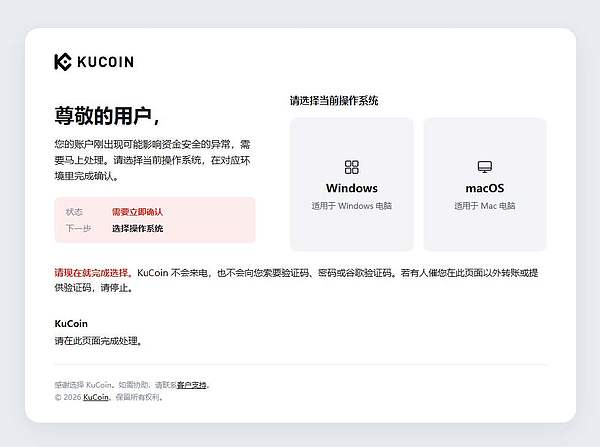
Figure 3 shows a fake KuCoin Security Center page that asks you to choose between Windows or macOS.
We performed static analysis on a Windows file. This 9,764,352-byte program retained compilation information, and the module name was directly written asoverlord-client. Further examination of the function names in the file revealedoverlord-client/cmd/agent/config.Load, corresponding to the configuration reading function in the Overlord source code. The screenshot module also retained theCaptureAndSendfunction name, consistent with its implementation name in the source code. We further verified the control connection format in the program, which also appears in the Overlord client source code. Based on this, we confirmed that this Windows file is the Overlord remote control client.
The Windows sample address ishttps://ku-security.com:5173/api/file-share/290924a0-2064-477f-b0dd-0cbfd6fa18ab/download, with SHA-256 encoding of3beb5f5fa9e01b382b79c152a6eb14b096e1ef0fabbc1ab6faf6b19326899d21. The macOS arm64 sample address ishttps://ku-security.com:5173/api/file-share/e9daf83a-5bf2-4d72-a98e-deece8984e87/download. The return address in all three samples (Windows, macOS arm64, and macOS amd64) iswss://3.1.159.255:5173, and the control connection address iswss://3.1.159.255:5173/api/clients/{id}/stream/ws?role=client. The connection uses TLS (Transport Layer Security) on port 5173. ku-security.com resolves to the same machine,wss://ku-security.com:5173is not present in the binary representation.
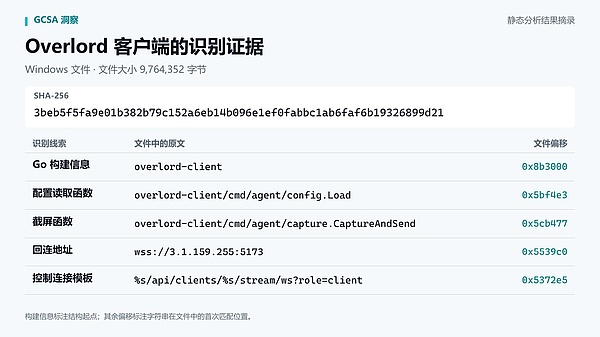
Figure 4. Static analysis evidence of Windows files: module name, function name, connection string, and file offset.
4. Other email phishing cases
In November 2023, the attack group Kimsuky impersonated journalists and sent interview emails to experts. The emails were sent to media domains that did not have DMARC deployed, but the recipients' replies were redirected to the attackers' accounts. A joint notification (JCSA-20240502-001) issued by the FBI, NSA, and State Department on May 2, 2024, included the sender information and Gmail verification results for these emails, obscuring the media names. The UK's HM Revenue and Customs has deployed DMARC since 2016. The UK government announced on June 30, 2018, that the agency had intercepted approximately 500 million phishing emails.
On January 23, 2024, employee accounts of email service provider MailerLite were compromised. Attackers used these accounts to send phishing emails targeting cryptocurrency wallets. The number of affected customer accounts was revised from 117 to 70, with four of them used to send phishing emails. MetaMask's February 2024 monthly report mentioned affected brands such as Cointelegraph and WalletConnect, reporting losses exceeding $580,000 at the time. SlowMist documented a scam impersonating Coinbase customer service in May 2025: attackers tricked users into transferring assets to their wallets via phone calls, text messages, and spoofed emails. The report also mentioned tools for forging official mailing addresses.
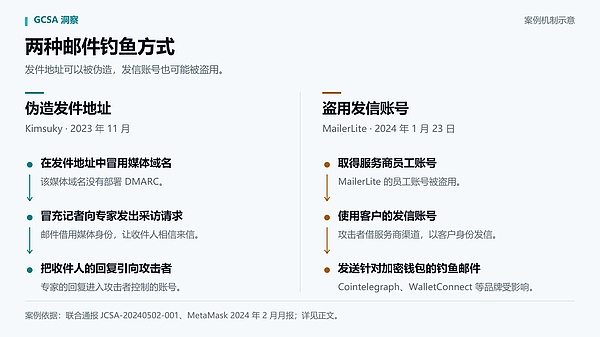 Figure 5 illustrates the mechanism of email phishing cases: Kimsuky forges the sending address, and the MailerLite case involves the theft of the sending account.
5. DMARC Configuration Recommendations for Sending Domains
The team responsible for the email system should first take stock of the domains held by the company and check their respective DMARC records. For domains currently sending emails, the authentication results should be verified against actual business emails, and emails sent by external service providers should also be included in the check. If authentication reports are collected using p=none initially, the source of the emails should be investigated based on the reports; this strategy is only for monitoring and does not require recipients to quarantine or reject emails. After confirming that legitimate business emails can pass the check, quarantine or reject should be enabled. Domains that have been deactivated and have no legitimate need for sending emails should also have a rejection policy implemented. After going live, the authentication reports should be used to investigate unauthorized sources of emails, while also checking the bounce records of normal business emails. When changing email service providers or adding new outsourcing channels, the authentication results of actual emails should be re-verified.
6. User Protection Suggestions
If you receive an email claiming "account abnormality" or "funds security," do not rely solely on the official domain name in the sender's address to determine its authenticity. Do not click on any links in the email. Instead, directly open the official app you normally use to verify the information. Do not install any so-called security programs or accept remote assistance as requested in the email. If you have set up anti-phishing codes, verify the codes in the email; do not give your password, verification code, mnemonic phrase, or private key to the sender. If you accidentally click on a link, close the page and do not enter any more information or download any files. If you have run any download programs, disconnect the device from the network. If you have already entered your password or verification code on a suspicious page, or run any programs, use a device that has not been exposed to these activities. Change your password through the official app, log out of all other logins, and check your recent withdrawal records. Keep the original email, download links, and any abnormal activity records. Contact customer service through the official app to investigate.
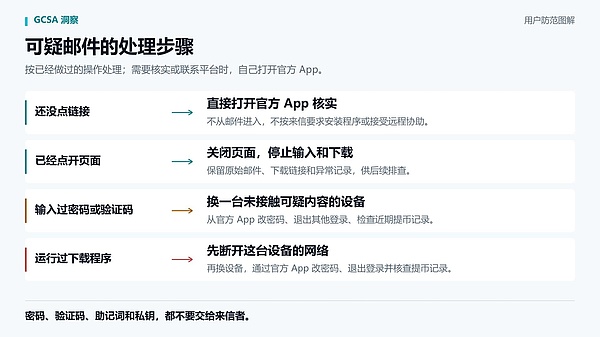 Figure 6. Steps for handling suspicious emails: Unclicked, Opened, Password or verification code entered, Program run.
[Part Two] Bitkub's official AI tool has been misused, putting users at risk of being compromised.
On October 31, 2026, during routine inspections, the GCSA Security Agent discovered that the MCP toolkit bitkub-trading-mcp-official, referenced in Bitkub's official API documentation, had been taken over by a third-party account, rd09. The original version of this package was released by Bitkub, but it was later removed from npm without having its name reclaimed. After the cooling-off period, rd09 registered and released version 1.0.1 on October 3. Users who configured the AI assistant according to Bitkub's official tutorials had their API keys written in plaintext in ~/.claude.json, which were injected into environment variables every time the program was launched. Even if the program crashed and exited, the key remained on the disk—the publisher could push a new version with a stealing script at any time, reading the key before the user even saw the program interface.
Event Summary
Bitkub provides a one-click installation command in its official API documentation repository, guiding users to query market data and manage trading accounts using AI assistants like Claude. The configuration requires entering the API Key and Secret, as shown in the following command:
claude mcp add bitkub-trading-mcp-official \ -e BITKUB_API_KEY=your_real_key_here \ -e BITKUB_API_SECRET=your_real_secret_here \ -- npx -y bitkub-trading-mcp-official
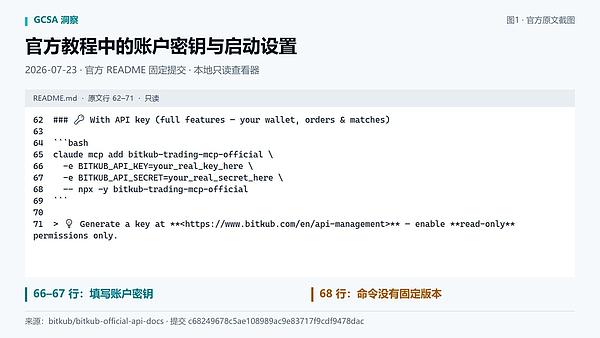 Figure 1: The configuration interface in the official tutorial, including the account key and the startup command for the unfixed version.
Bitkub released two versions, 1.0.2 (July 23, 2026) and 1.1.0 (August 18, 2026). They later hid the installation instructions in HTML comments and removed all versions from npm, but did not reclaim the package name or notify configured users. According to npm rules, package names are open for registration to everyone after a cooldown period. On October 3, 2026, a third-party account, rd09, registered the package name and released version 1.0.1, becoming the sole publisher of that package name on npm.
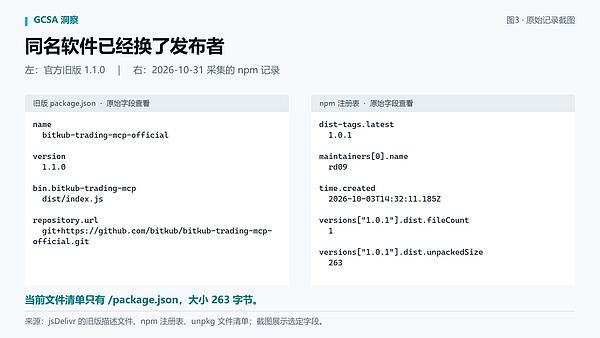 Figure 2: The old version pointed to the official Bitkub repository; the current default version has been released by rd09.
The installation commands are no longer visible in the Preview view on the GitHub page, but the full content can still be accessed via the raw link, git clone, or the GitHub API. Configurations previously saved locally by the user will not be automatically lost.
Why are there risks?
The current version 1.0.1 only has a 263-byte package.json file and no executable file, causing npx to exit with an error. The problem lies in npm's installation mechanism and configuration persistence method—an error exit does not mean that no code was executed.
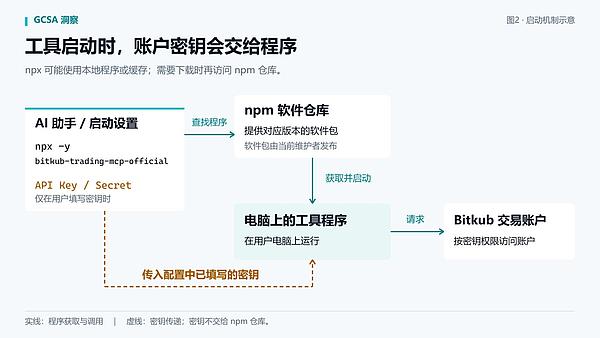
Figure 3: The startup settings also determine which program to run and whether to pass an account key to it.
The installation script executes before the program.
The `npm install` process is: unzip → execute the preinstall/postinstall script → parse the entry file. The script execution phase and entry file verification are decoupled: even if there is no valid executable file within the package, the preinstall or postinstall script has already completed its execution during installation. For rd09, simply pushing a new version with a script is sufficient; a single line of `process.env.BITKUB_API_KEY` retrieves the key during the installation phase. The key is read before the program starts, before you even see any errors.
The key is persisted locally in plaintext.
The `claude mcp add` command writes the key-value pairs from the `-e` parameter to the MCP configuration file (`~/.claude.json` or `.mcp.json` in the project directory). Once the configuration is written, the keys remain on disk in plaintext. Even if the package installed at that time is empty, the credentials will still be re-injected into the environment variables the next time the AI assistant is launched. Every day since you typed that command has been a window for attacks.
npx -y - Do not verify publisher
`npx -y` searches only for versions pointed to by `dist-tags.latest` by package name. `-y` skips installation confirmation prompts, not source verification. It doesn't check if the maintainer is Bitkub, nor does it verify if the package contains an executable file. If the cache expires, it will pull the rd09 version. `npx` will not tell you that it's downloading code that isn't Bitkub.
What consequences might a malicious version cause?
When a key has transaction permissions, malicious programs can directly call `/api/v3/order/create` to sell all holdings at market price, or call `/api/v3/user/info` to read balances and historical orders. These requests are completed in milliseconds, and by the time the user notices the anomaly, the assets have already been transferred. Even if the key only has query permissions, the program can still traverse `~/.ssh/`, `~/Library/Keychains/`, the browser's cookie database, and `.env` and `.mcp.json` files in the same directory, package them, and upload them to a remote server. Setting the transaction key to read-only does not prevent this behavior. Withdrawals are subject to platform risk control restrictions, but order placement and information reading are not.
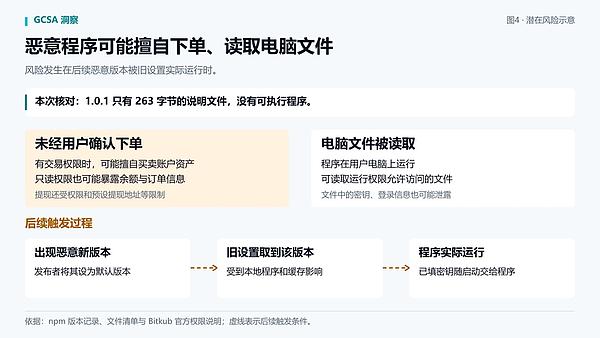 Figure 4: Malicious programs may use keys to place orders or read computer files.
What should you do now?
1. Disable Bitkub connection in the AI assistant.
Open the MCP tool settings in Claude or other AI assistants, find the bitkub-trading-mcp-official entry, and delete or disable it.
2. Manually delete the key from the local configuration.
Disabling the tool alone will not remove saved keys. First, rungrep -r "BITKUB_API" ~/.claude.json .mcp.jsonto confirm if the key remains, then open the following file and delete the relevant configuration sections:
- ~/.claude.json
- The .mcp.json file in the project root directory
3. Revoke and replace the Bitkub API key.
Log in to Bitkub, go to the API management page, revoke the old key, and generate a new key. Do not configure the new key using the same command.
4. Verify account activity
We will focus on verifying all orders, withdrawal records, and login logs from October 3, 2026 to the present. If any anomalies are found, please contact Bitkub customer service immediately and freeze the account.
5. Investigate other sensitive information locally.
If you have saved key files for other exchanges, wallets, or services on your computer, it is recommended to replace them as well.
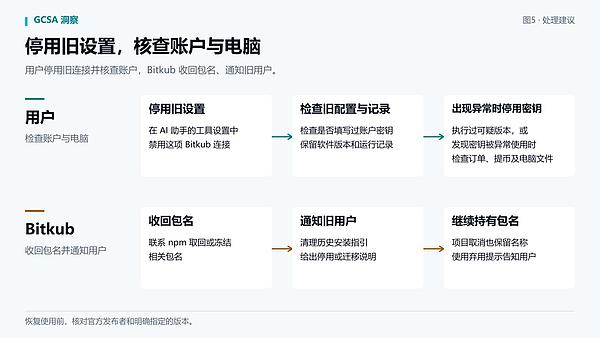 Figure 5: Users disable old connections and investigate the impact; Bitkub retrieves package name and updates installation guide.
Supplementary Explanation
npm's package name release mechanism
The npm platform has a package name release mechanism: after the original publisher removes all versions, the package name becomes available to all registered users after a cooldown period. The problem is that Bitkub neither reclaimed the package name nor changed it before removing the old version, nor did it update documentation to guide users through the migration process. The disappearance of tutorials from the page does not mean the risk has disappeared; the local keys of configured users remain exposed, and the platform did not notify existing users to check or migrate through any channel.
Behavioral patterns of account rd09
This account has 12 packages, most of which have the same names as existing agency packages and only contain empty package.json files. One of these packages (ably-bulk-subscriber) includes a postinstall script, which claims to be a Dependency Confusion PoC: after execution, it writes the entire process.env to /tmp/dc-poc-test.json and prints "Dependency Confusion PoC — env captured" to the console. Anyone who obtains this code can simply change the write path to a remote URL to transform it from a PoC into a real data theft scenario.
Recommendations for subsequent use
In the future, before using npm packages, ensure the publisher is an official organization and specify the version number in the startup command instead of relying on `latest`. Regularly check the status of configured tools and corresponding packages, and follow the principle of least privilege for key permissions, avoiding granting unnecessary transaction or withdrawal permissions.
[Part Three] Analysis of the $1.01 Million Accounting Vulnerability at Avalanche TranchePool
Previous events
The contract in question is a Tranche Vault on the Avalanche C-Chain, denominated in USDC, with deposits and withdrawals recorded separately for each tranche. Before the attack, the vault balance was 1,013,353.611686 USDC, exactly equal to the remaining balance in tranche 0 (3,000,000 deposited, 1,986,646.388314 withdrawn). The attack occurred in two separate attacks, 163 blocks apart and 202 seconds apart, crossing the UTC midnight mark in between.
| Time (UTC) | Block | trade | action |
|---|---|---|---|
| 2026-10-27 23:56:41 | 98731443 | 0x19ab…99fd | Borrowed 1,013,353.611686 USDC from Aave V3 flash loan, created a new transfer account 1, deposited the same amount and withdrew it on the same day, resulting in a net balance of 0 with the vault; subsequently repaid 1,013,860.288492 USDC. |
| 2026-10-28 00:00:03 | 98731606 | 0x3f6b…8c77 | After midnight, another 1,013,353.611686 USDC was withdrawn using the same withdrawal calldata as the first transaction, bringing the vault balance to zero. |
Vulnerability Analysis
The vulnerable contract is0xe25cb545bdd47a8ec2d08001cb5661b00d47621a.
The root cause lies in the fact that the vault binds daily settlement and withdrawal limit checks to the same transcript record, with settlement preceding the check. Each transcript contains one record, storing the deposited amount, withdrawn amount, and date. During withdrawal, the available amount is calculated by subtracting the withdrawn amount from the deposited amount; if the amount is insufficient, an error string 15 is used to roll back the transaction. However, the settlement function directly clears the withdrawn amount to zero when the date changes, ensuring that the same record displays the full available amount again after the next day.
When making a withdrawal, function0x8e27c105calculates the available balance through subtraction:
v38 = 0x3db9(_tranches[v7[v16]].field2_0_15, _tranches[v7[v16]].field1_16_31);
field2_0_15represents the deposited amount,field1_16_31represents the withdrawn amount, and0x3db9performs a subtraction. After the check passes, the current amount is added to the withdrawn amount.
 Figure 1: Decompiled withdrawal function from Dedaub. The red box shows the two fields retrieved for the credit limit check.
The problem is that the withdrawal function calls the settlement function0x447cbefore calculating the available balance. This function checks the day, skipping the entire segment if the record date equals the current UTC date.
if (uint128(MEM[uint8.max + 1]) == _tranches[varg0].field1_0_15) {
return;
}
Only proceed after crossing the zero point; in the following branches, directly set the raised field to 0:
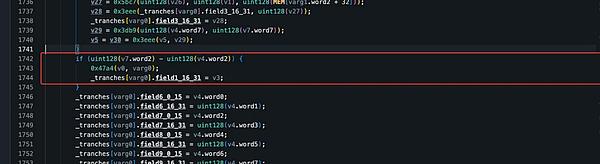 Figure 2: The day-cut branch directly writes field1_16_31 as a new value.
This breaks two invariants. First, the withdrawn amount is not a cumulative value but a temporary field that can be reset daily. Therefore, the same deposit can be returned with the full available amount after the next day without any new funds entering. Second, withdrawals only check the available amount in the transfer record; the actual USDC balance in the vault is not verified before the transfer, and the reset amount can be directly cashed out from the public balance.
On-chain readings confirm this process. The one mentioned is the newly created transcript 1 from the attack:
| Time point | day | Already submitted | deposit |
|---|---|---|---|
| After the first stroke (98731443) | 1793059200 | 1013353611686 | 1013353611686 |
| Before the second transaction (98731605) | 1793059200 | 1013353611686 | 1013353611686 |
| After the second stroke (98731606) | 1793145600 | 1013353611686 | 1013353611686 |
The available balance for the second transaction was 0, but the second transaction paid the full amount. The date field was changed to the current day, the withdrawn amount was cleared by settlement, the deposit remained unchanged, and the available balance returned to the full amount using the same subtraction. At the end, the withdrawn amount remained the original value—settlement precedes checks. This mechanism has a hard dependency on cross-day transactions: the same withdrawal calldata was replayed usingeth_callat block 98731500 (10-27 23:57:41), rolling back with error string 15; it was replayed at block 98731605 (10-28 00:00:02), returning 1,013,353,611,686; changing the amount to 10 million also resulted in a rollback of 15.
The record for tranche 0 further confirms the issue with the public balance withdrawal: 3,000,000 was deposited, and 1,986,646.388314 was withdrawn, with a difference of exactly 1,013,353.611686—equal to the amount withdrawn in the second transaction. The attacker first deposited the money using a flash loan and withdrew the full amount on the same day, leaving a net balance of 0; then, after midnight the following day, they used the same calldata to withdraw the same amount, taking away the money that was originally in the vault.
Attack Analysis
The following analysis is based on transactions 0x19ab…99fd (block 98731443) and 0x3f6b…8c77 (block 98731606). Attacker EOA 0x6ff1…1246 executes all operations via self-deployed contract 0xf09d…7805.
Step 1:The attacker calls the attack contract0xea7b0dec, passing in Aave V3 Pool, USDC and the amount 1,013,353,611,686, and the contract initiates flashLoanSimple to borrow the equivalent amount of USDC from Aave.
Step 2:Within the flash loan callback `executeOperation`, the attacking contract first approves the vault with the same amount, then sequentially initiates five calls to the vault to complete the initial position and same-day withdrawal: First, it creates the record for transfer 1 using0xb1f70fbcand0x200634ba; then, it triggers `transferFrom` with0xcec66073to push the flash loan funds into the vault; next, it writes the maturity date and amount using0x2d02d600; finally, it withdraws the same amount of USDC back to the attacking contract using0x8e27c105. These five calls all use the vault's legitimate external interface, but the attacker arranges them into a special sequence of "same-day deposit → same-day full withdrawal," causing the record for transfer 1 to show a state of "deposited = withdrawn, available amount = 0" before the callback ends, laying the groundwork for replaying the withdrawal `calldata` the next day.
Step 3:Before the pullback ends, the attacking contract returns a total of 1,013,860.288492 USDC (interest of 506.676806) to Aave, including principal and interest. At the end of the first transaction, the vault balance remains unchanged, and the net amount between the attacker and the vault is 0; however, the record for transaction 1 has been written: 1,013,353,611,686 deposited, 1,013,353,611,686 withdrawn, and 0 available funds for the day.
Step 4:202 seconds later (block 98731606, past UTC midnight), the attacker calls0x767081d1of the attack contract, passing in an 804-byte data segment. This data segment is identical byte-by-byte to the calldata segment of the 5th call in Step 2, which expands to0x8e27c105(1013353611686, … ); the attack contract does not rewrite the data and calls it to the vault exactly as is.
Step 5:The vault re-enters the withdrawal function. The available balance is recorded as 0, but because it's past the previous day, the settlement function executes before the balance check, clearing the withdrawn funds to zero. The check then passes. The vault does not verify the USDC balance and directly transfers 1,013,353,611,686 to the attacking contract, reducing the balance to zero.
in conclusion
This incident stemmed from binding the daily settlement status and withdrawal limit ledger to the same field, with settlement performed before limit checks. The withdrawn amount was not a cumulative value and was reset to zero after the next day, allowing the same deposit record to repeatedly show the full available limit; and the actual vault balance was not verified before withdrawals and transfers, so the reset limit could be directly withdrawn from the public pool.
The protocol should not allow settlement functions to rewrite fields on which limit checks depend. If daily withdrawal statistics are required, a separate daily counter should be stored, independent of the cumulative withdrawal field. The withdrawal limit for each tranche should also be constrained by the actual funds invested in that tranche, not solely by withdrawals from the public balance based on ledger records. Furthermore, invariant tests should be written for state transitions such as day-cut, maturity, and rollover to ensure thatsum(tranche.available) <= vault.usdcBalance()always holds true before and after any transition.
Copyright Notice and Disclaimer
This report and related technical analysis are exclusively published by the GCSA Global Cybersecurity Alliance. For reprint permission, please retain the official GCSA source and original link in full, and do not maliciously alter the core viewpoints of the report.
This report is intended for cybersecurity research, technical exchange, and risk prevention reference only. The analysis is based on information and evidence available at the time of publication and does not constitute a final determination of liability to any organization or individual. GCSA reserves the right to update research conclusions based on new evidence and feedback from relevant parties.
Follow GCSA on the following social media platforms for the latest updates.
GCSA Twitter:x.com/gcsahk
GCSA Telegram Channel:t.me/gcsaofficial
GCSA WeChat Official Account:https://mp.weixin.qq.com/s/D3ctdy9JHXM68g-CGZCjUA
Source:Global Cybersecurity Alliance (GCSA)
Website:www.gcsa.org
Get updates in your inbox
We respect your privacy. See our Privacy Policy